Skip to content
 Amazon eero 7 Dual-Band Wi-Fi 7 Mesh, 3-Pack Review: Is It Worth It?
Most mesh Wi-Fi reviews stop at specs. This one does not. The question worth answering is not whether the Amazon eero 7 supports Wi-Fi 7 — it does — but whether a dual-band Wi-Fi 7 mesh system at this price point is the right call for your home, your internet plan, and your device count. That is a different question, and most competing pages skip it entirely.
This is a RESEARCH-BASED REVIEW. We have not personally installed and tested this unit. Our analysis draws on published specifications, manufacturer documentation, and editorial judgment about how those specs translate to real household use. Where evidence is missing, we say so plainly.
The eero 7 3-pack is a well-designed, genuinely simple mesh system that brings Wi-Fi 7 to households that prioritize app ease and Amazon ecosystem fit over raw throughput. It earns its place in the right home. But dual-band architecture is a real constraint for dense device loads and large, multi-story layouts — and that tradeoff deserves honest attention before you buy.
Best for: Renters and homeowners in small-to-medium spaces (roughly up to 5,500 sq ft across three nodes per eero’s published coverage claims), households on gigabit-or-below internet plans, Amazon smart-home users, and anyone who wants a mesh system they can set up and forget without touching a router admin panel.
Avoid if: You have 50+ connected devices competing simultaneously, a multi-story home with thick concrete or brick walls, a plan above 1 Gbps that you actually want to saturate, or a need for tri-band backhaul to keep node-to-node traffic from eating into client bandwidth.

What You Are Actually Buying
The eero 7 (3-Pack) is Amazon’s entry point into Wi-Fi 7 mesh. Wi-Fi 7 (802.11be) is the current generation standard, and its headline improvements over Wi-Fi 6E include higher theoretical throughput, Multi-Link Operation (MLO), and lower latency under congestion. The eero 7 is dual-band, meaning it operates on 2.4 GHz and 5 GHz only — there is no 6 GHz radio. That is the single most important architectural fact to understand before buying.
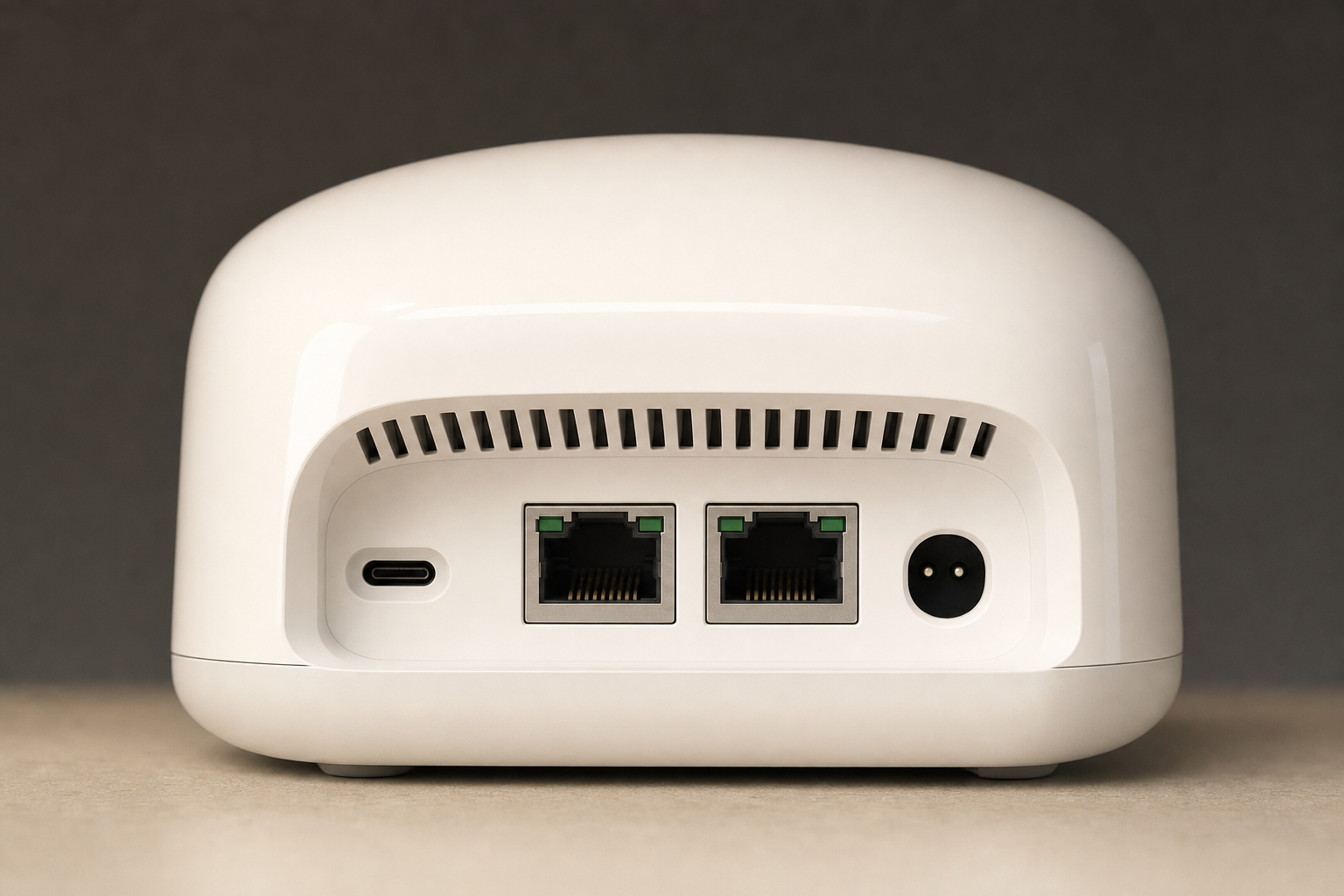
Each node includes two Ethernet ports. That is enough for a wired connection to one device per node, or for wired backhaul between nodes if your home is pre-wired — but it is a tight port budget compared to some competitors. eero does not state whether both ports run at 2.5 GbE or one is capped at 1 GbE. Confirm on the official product page before buying if wired speed matters to you.
Setup and management run entirely through the eero app. There is no web-based admin interface. That is a deliberate design choice that keeps things simple for most users and frustrating for anyone who wants granular control.
Strengths
- Genuine Wi-Fi 7 hardware at a lower price tier. Getting 802.11be support without paying for a premium tri-band system is a real value proposition for households whose internet plans and device counts do not demand tri-band.
- App setup is among the simplest in the category. The eero app is consistently cited for its guided setup flow. For households that have struggled with traditional router interfaces, this matters practically.
- Amazon and Alexa integration is native. Voice control of network features, Alexa Hunches for smart-home routines, and tight integration with Amazon devices are genuine advantages for households already in that ecosystem.
- Wired backhaul is supported. If your home has Ethernet runs between floors or rooms, you can wire the nodes together and eliminate wireless backhaul overhead entirely — a meaningful performance improvement that many buyers overlook.
- Three-node coverage. eero publishes a coverage figure for the 3-pack, but we have not verified the current square-footage claim — those estimates change between product revisions, so read it off the live listing.
Weaknesses and Tradeoffs
- Dual-band means shared spectrum for backhaul and clients. In a tri-band system, the third radio (often 6 GHz or a dedicated 5 GHz band) handles node-to-node traffic, leaving the other bands free for devices. In a dual-band system, backhaul and client traffic share the same two bands. In a lightly loaded home with wired backhaul, this is a non-issue. In a wirelessly backhauled setup with many devices, it is a real constraint.
- No 6 GHz radio. Wi-Fi 7’s most congestion-resistant band is 6 GHz. The eero 7 does not include it. In dense apartment buildings where 2.4 GHz and 5 GHz are crowded, this is a practical limitation.
- Two Ethernet ports per node is a tight budget. Power users who want to wire multiple devices per node — a desktop, a smart TV, a NAS — will hit the port limit quickly.
- No web admin interface. App-only management is a feature for some buyers and a hard stop for others. IT-minded users who want VLAN configuration, detailed traffic logs, or advanced QoS controls will not find them here.
- Some features require an eero Plus subscription. See the subscription section below.
Dual-Band vs Tri-Band: When It Actually Matters for Your Home
This is the question most reviews skip. Here is the practical breakdown:
Dual-band is likely sufficient if: You have fewer than roughly 30–40 simultaneous active devices, your home is single-story or has good line-of-sight between nodes, you plan to use wired backhaul, or your internet plan is 1 Gbps or below and you are not trying to push maximum throughput to multiple devices at once.
Tri-band becomes worth the extra cost if: You have a dense device load (smart home sensors, multiple 4K streams, work-from-home video calls, gaming, and NAS backups all running simultaneously), you cannot run Ethernet between nodes, or you are on a multi-gig plan and want to actually use that bandwidth across the whole home.
For the majority of households — a family in a 2,000–4,000 sq ft home, a gigabit internet plan, 20–35 connected devices — the eero 7 3-pack’s dual-band architecture is not a meaningful bottleneck in everyday use. The buyers who will feel the constraint are the ones at the edges: dense device loads, wireless-only backhaul, and multi-gig plans.
Setup and App Experience
The eero app handles everything: initial setup, node placement guidance, device management, guest network creation, and parental controls. There is no separate web portal. Setup is designed to take under ten minutes for a standard installation, and the app provides placement recommendations based on signal strength between nodes.
The absence of a web interface is worth flagging again because it affects long-term management, not just setup. If your phone is unavailable or the app has an outage, your management options are limited. For most households this will never matter. For households with specific technical requirements, it is a genuine gap.
What Requires an eero Plus Subscription
eero offers a paid subscription tier (eero Plus) that gates certain features behind a monthly or annual fee. Based on published eero documentation, this includes advanced content filtering, ad blocking, and some security features. Basic network management, guest networks, parental controls (at a basic level), and app setup do not require a subscription. eero has adjusted what sits in the free tier versus Plus over time and we have not verified the current split, so check the current breakdown on eero’s official site before factoring subscription cost into your budget decision.
Price and Value
The eero 7 3-pack sits at a price point that is meaningfully lower than tri-band Wi-Fi 7 mesh systems and somewhat higher than older eero models like the eero 6+. Whether that positioning makes sense depends on your situation:
- If you are upgrading from an older single router or a Wi-Fi 5 mesh system, the eero 7 3-pack represents a genuine generational step at a reasonable entry price for Wi-Fi 7.
- If you are comparing it to the eero 6+ (Wi-Fi 6, dual-band), the eero 7 offers Wi-Fi 7 hardware and MLO support — worth the premium if you plan to keep the system for several years and want to be on current-generation hardware.
- If you are comparing it to the eero Pro 6E or a tri-band Wi-Fi 7 competitor, the question is whether your household actually needs tri-band. If the answer is yes, the eero 7’s lower price is not a saving — it is a mismatch.
Check price on Amazon — pricing on mesh systems shifts regularly, and the gap between the eero 7 and eero Pro tiers is worth confirming before deciding.
Comparison: eero 7 vs eero 6+ vs eero Pro 6E
| Feature | eero 7 (3-Pack) | eero 6+ (3-Pack) | eero Pro 6E (3-Pack) |
|---|---|---|---|
| Wi-Fi Generation | Wi-Fi 7 (802.11be) | Wi-Fi 6 (802.11ax) | Wi-Fi 6E (802.11ax) |
| Band Configuration | Dual-band (2.4 + 5 GHz) | Dual-band (2.4 + 5 GHz) | Tri-band (2.4 + 5 + 6 GHz) |
| 6 GHz Radio | No | No | Yes |
| Dedicated Backhaul Band | No (wireless) | No (wireless) | Yes (6 GHz) |
| Wired Backhaul Support | Yes | Yes | Yes |
| Ethernet Ports per Node | 2 (speed not published) | 2 (1x 2.5 GbE, 1x 1 GbE) | 2 (1x 2.5 GbE, 1x 1 GbE) |
| App Management | Yes (app-only) | Yes (app-only) | Yes (app-only) |
| Alexa Integration | Yes | Yes | Yes |
| Best For | Simple homes, gigabit plans, Amazon ecosystem | Budget-conscious, older devices | Dense device loads, multi-gig plans |
Note: eero 6+ and eero Pro 6E specs are drawn from published eero documentation. eero 7 Ethernet port speeds are not published, so that cell is left unfilled rather than estimated.

Frequently Asked Questions
Is the Amazon eero 7 Dual-Band Wi-Fi 7 Mesh 3-Pack worth it?
For the right household, yes. If you want a simple, app-managed Wi-Fi 7 mesh system for a small-to-medium home with a gigabit-or-below internet plan and moderate device count, the eero 7 3-pack delivers current-generation hardware without the complexity or cost of a tri-band system. If your needs push toward dense device loads, multi-gig plans, or wireless backhaul in a large home, a tri-band option is a better fit.
Who should buy the eero 7 3-pack?
Households that prioritize setup simplicity, Amazon and Alexa integration, and whole-home coverage without managing a traditional router. It suits renters, families in single-story or two-story homes, and anyone upgrading from an older single router or Wi-Fi 5 system who wants to land on current-generation hardware.
Is dual-band Wi-Fi 7 enough for most homes?
For most homes, yes. The majority of households have internet plans at or below 1 Gbps and fewer than 40 simultaneously active devices. In those conditions, dual-band Wi-Fi 7 with wired or wireless backhaul handles everyday streaming, video calls, and smart-home traffic without meaningful bottlenecks. The constraint shows up at the edges: very dense device loads, wireless backhaul in large multi-story homes, or multi-gig internet plans.
How does the eero 7 compare with the eero 6+ and eero Pro 6E?
The eero 7 is newer-generation hardware than the eero 6+ (Wi-Fi 7 vs Wi-Fi 6) but shares the dual-band limitation. The eero Pro 6E adds a 6 GHz radio that serves as a dedicated backhaul band, which meaningfully improves performance in wirelessly backhauled setups with high device density. If you can run Ethernet between nodes, the eero 7’s lack of a dedicated wireless backhaul band matters less. See the comparison table above for a side-by-side view.
Does the eero 7 3-pack work well with Alexa and smart-home devices?
Yes. Amazon-native integration is one of the eero 7’s genuine strengths. Alexa can manage basic network functions, and the system works within Amazon’s broader smart-home ecosystem. If you are already using Amazon Echo devices, Fire TV, or Ring, the eero 7 fits that environment more naturally than most third-party mesh systems.
Can you use wired backhaul with the eero 7 mesh system?
Yes. If your home has Ethernet runs between the locations where you plan to place nodes, you can wire the nodes together. This eliminates the wireless backhaul overhead that is the main practical limitation of dual-band mesh systems. Wired backhaul is the single most effective way to improve performance in any mesh system, and the eero 7 supports it.
What features require an eero Plus subscription?
Basic network management, guest networks, and standard parental controls are available without a subscription. Advanced content filtering, ad blocking, and enhanced security features are gated behind eero Plus. eero has adjusted this split over time, so confirm the current breakdown on eero’s official site before buying if subscription cost factors into your decision.
Is the eero 7 a good choice for gigabit internet plans?
Yes. A gigabit internet plan is well within the eero 7’s design envelope. Where the system’s dual-band architecture becomes a more visible constraint is on multi-gig plans (2.5 Gbps and above) where you are trying to push maximum throughput to multiple devices simultaneously across a wirelessly backhauled mesh. For standard gigabit service, the eero 7 3-pack is a reasonable match.
Final Verdict
The Amazon eero 7 Dual-Band Wi-Fi 7 Mesh 3-Pack is a well-considered product for a specific buyer. It brings Wi-Fi 7 hardware to households that want simplicity, Amazon ecosystem fit, and whole-home coverage without paying for tri-band capability they do not need. The app experience is genuinely straightforward, wired backhaul support is a practical asset, and the price sits at a reasonable entry point for current-generation mesh hardware.
The honest limitations are real but bounded. Dual-band architecture with shared wireless backhaul is a constraint for dense, wirelessly backhauled setups — not a flaw for the buyer this system is designed for. The two-port-per-node Ethernet budget and app-only management are deliberate tradeoffs that favor simplicity over flexibility.
If your home, device count, and internet plan fit the profile described above, the eero 7 3-pack earns a straightforward recommendation. If you are at the edges — high device density, multi-gig plans, or a need for granular network control — spend more on a tri-band system or look at a platform with a web admin interface.
Next step: Check price on Amazon and confirm the Ethernet port specs on the listing before purchasing — eero does not publish the port speeds, and on a Wi-Fi 7 system that is worth knowing before you spend the money.